Events
More symbols and attributes than those listed here may exist for the object types. But Process Governance only interprets the ones listed. The attributes for Process Governance are contained in the Process automation attribute type group.
Symbol shape/ Symbol name | Description | Attributes (process automation) |
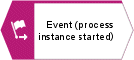 | Triggers automation and generates the process instance. | No object-specific attributes (process automation) |
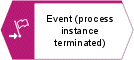 | Terminates the process instance. | No object-specific attributes (process automation) |
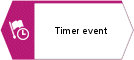 | Delays the next process step until the specified Process Governance time. | No object-specific attributes (process automation) |
 | Describes the status. | No object-specific attributes (process automation) |
Event (process instance started)
In an EPC, the following modeling conventions must be observed for the Event (process instance started) object symbol:
The EPC assigned to the function in the superior value-added chain diagram must have exactly one Event (process instance started) object symbol.
The Event (process instance started) object symbol can be modeled only once in a Process Governance process.
Event (process instance terminated)
In an EPC, the following modeling conventions must be observed for the Event (process instance terminated) object symbol:
In the Process Governance process, there must be at least one Event (process instance terminated) object symbol.
As the Event (process instance terminated) object symbol terminates the process instance, it must be the last object in the Process Governance process.
The process can continue after the Event (process instance terminated) object symbol if, for example, steps follow that are not relevant to Process Governance.
Timer event
An event can depend on a certain point in time. In this case, an object of the Event type with the Timer event object symbol has to be used, and the Date attribute must be assigned to this event in the data flow diagram.