Create - Human task log
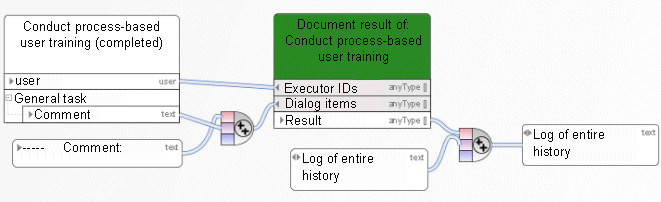
The service returns the input a person enters in the dialog when carrying out a function of type Human task. The result delivered by the service can, for example, be entered in the Change list attribute of a model or object to ensure detailed documentation.
In/Out | Name | Details | Data type |
|---|---|---|---|
 | Dialog elements | Copy the function of type Human task as a recurring task and connect the recurring task with a dialog element, e. g., a comment. To log more than one dialog element use the Concatenate operator. Please use constants for structuring the connected dialog element input, e. g., model a constant with the dialog element name before connecting the dialog element itself. You may also use constants as separators, e. g., spaces and semicolons. | <Any> |
| Executor IDs | Copy the Human task function you want to log as a recurring task and connect it to the field containing the IDs of the executors. Logging is done for each executor. | <Any> |
 | Result | Entries by an executor of the connected Human task function that was copied as a recurring task are logged for the selected dialog elements per executor and entry. The result delivered by the service can, for example, be entered for the Change list attribute of a model or object to ensure detailed documentation of what input executors specified for the dialog of the Human task function type. | <Any> |