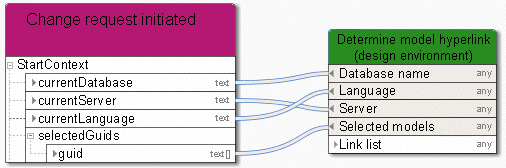
Retrieve - Link (design)
The service provides a list of model links. These links may be used as input data for a dialog to enable the user to access the ARIS modeling database. The linked model opens and can be edited.
In/Out | Name | Details | Data type |
|---|---|---|---|
 | Database name | Connect the database where your models are stored. To do this, connect an object of type Event (process instance started), Human task, or Automated task. | <Any> |
| Language | Language an object of type Automated task uses to log in to the database, e. g., en for English. | <Any> |
| Server | Connect the server on which the database is stored. To do this, use the object of type Event (process instance started). | <Any> |
| Selected models | Select the models you want to find. Connect models from the preselection of another object of type Human task, Automated task, or Event (process instance started). | <Any> |
 | Link list | A link list is provided for all relevant models. The links may be used as input data for a dialog to enable the user to access the ARIS modeling database. Please note: Exactly one link is allowed for each link field in a dialog. The service provides a list of links if more than one link is specified for accessing a model. In the data flow of a dialog, model every single link by using an operator determining the selection. | <Any> |