How to resolve modeling errors
If you generate the executable process for non-compliant models, error messages are displayed in the Messages on executable processes bar in a list. Using this information, you can eliminate the errors and perform the action again.
You can perform additional actions using the pop-up menu. To open and display the relevant model, click Navigate to object. Activities or connections containing errors are marked with a warning symbol. Activities are also highlighted in color.
Use the Show details option in the pop-up menu to display additional information:
ID and name of the affected model
IDs and names of the affected objects
IDs of connections that are not permitted or that have caused the error
Detailed description of the error
The information can be copied to the clipboard by selecting Copy in the pop-up menu. Selecting Delete all in the pop-up menu removes all messages.
The Navigate to object and Show details options in the pop-up menu are available only if the message was generated by automatic validation of the BPMN diagram. These options are not executable for messages that were generated by the transformation or archiving.
Modeling error [600.14]
Full error message:
Generating the executable process failed. [600.14] Object '<object name>' of type '<object type>' may have only one outgoing connection.
If the error message [600.14] is displayed, you can resolve the error by inserting a dummy object, as described below.
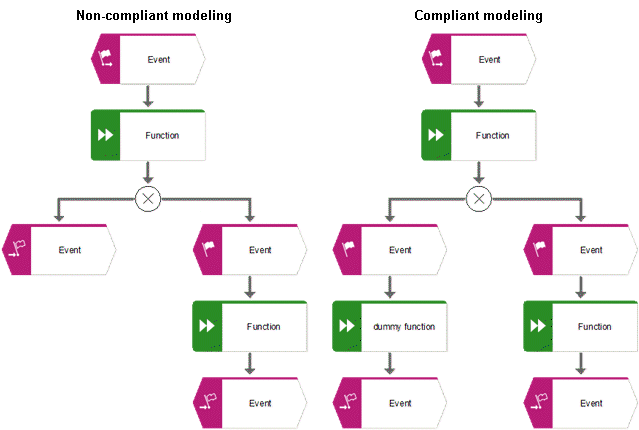
Modeling error 1: The process ends after a variable assignment or XOR rule
Solution: Open the epc model and add at least one dummy function at the process end.
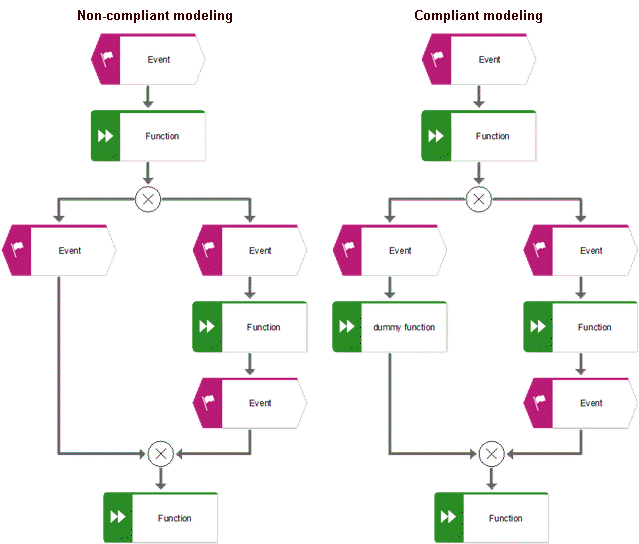
Modeling error 2: An XOR split is followed by an event and an XOR join
Solution: Open the epc model and add a dummy function between the event and the XOR join.