Privilege management
Privilege management for IT landscape planning has been significantly simplified using reports. In addition, all IT landscape macros have been updated.
If you have already created a process support map using a previous version, you will have to migrate your data so that the new reports and extended macros will work properly.
To ensure that user or user group access privileges can be assigned to every process support unit, all process support units from a database are now automatically managed in a separate group structure. You can set up this group structure below any chosen group. If necessary, you can define this group on the Administration tab in the configuration file by entering the relevant group name (in this case: "Process support unit") between the <PsuParentGroup> and </PsuParentGroup> tags. If no group has been defined there, the main group is automatically used. The following group structure is created for each process support unit:
Group named after the object type in the column header
in this example: Function
Group named after the column header
in this example: Send contract documents to supervisor
Group named after the object type in the row header
in this example: Organizational unit.
Group named after the row header
in this example: Production UMG America.
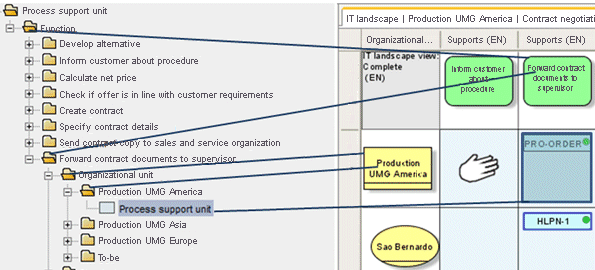
Only IT landscape administrators can run IT landscape administration macros:
IT landscape administrators must have the following privileges:
The Write access privilege for the entire group structure in which the process support units are managed.
The User management function privilege.
Authorized users, such as IT landscape planners and enterprise architects, can use the non-administrative macros to add assignments, for example. These users require Write access privileges for the groups in which the process support units are stored.
The IT landscape administration - Assign administration access privileges report is used to manage the privileges for user groups that are to manage the privileges of IT landscape planners, while the IT landscape administration - Assign access privileges report is used to manage the access privileges of IT landscape planners and enterprise architects. The IT landscape administration - Output access privileges report provides an overview of current privilege assignments.