Best practice: Use ARIS for SAP Solutions
The Best practice document shows you an easy way to transfer your SAP® Solution Manage data into the ARIS database, add missing structural elements and synchronize the data with the SAP system.
Log in to ARIS Architect.
Create solution configuration: This configuration ensures that all functions for exchanging data between ARIS and SAP® Solution Manager are available to users. These steps and recommendations ensure a smooth and error-free integration of SAP® Solution Manager data into ARIS, optimizing the use of both systems for business process management and documentation.
Transfer the data to ARIS databases from SAP® Solution Manager to map branch structures clearly in ARIS.
With assistance, insert the missing structure elements into the database. This ensures that the consistency rules are adhered to and that the correct hierarchical assignment structure is maintained. Thus, you ensure a smooth and error-free integration of the SAP® Solution-Manager data into ARIS and optimize the use of both systems for business process management and documentation. For more information, refere to the following topics:
Create executables with assistance
To check the added content in SAP® Solution Manager, switch to the blueprint.
As an example, we downloaded our fictive Development branch of the DEMO_ARIS Branch solution to the SAP database subgroup. The top structure always starts with a root function of the Project SAP function type. This root function, as well as the subgroup containing the branch's content, always has the same name as the SAP project or branch.
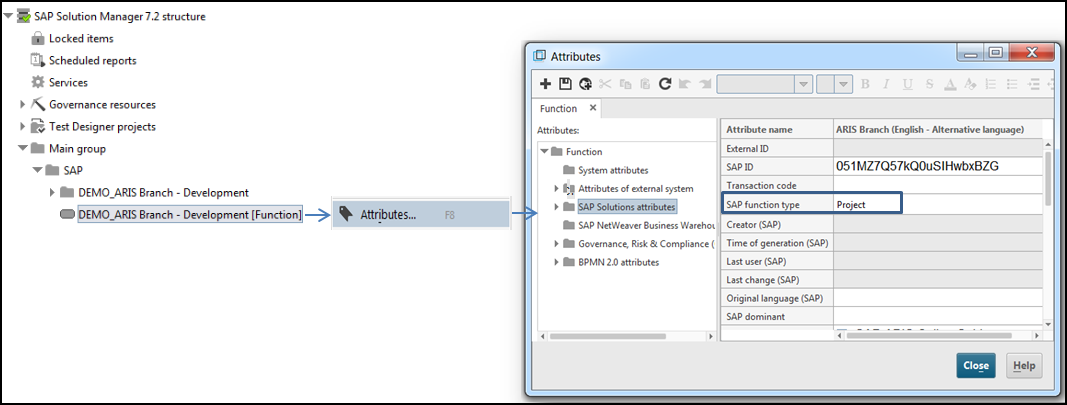
The subgroup stores the content in hierarchical levels.
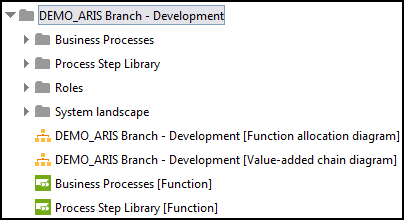
It contains the Business Process, Process Step Library, Roles, and System landscape subgroups. By default, the hierarchical structure is mapped without using a method configuration as follows. If you want to use BPMN TM, for example, you must customize the method configuration accordingly.